BossLaser Tips and Tricks: Difference between revisions
From makernexuswiki
(Created page with "Q: I have issues with the y-axis being out of scale, and the gantry won't travel past about halfway across the bed. :A: This is a common problem caused by failing to disable the rotary attachment feature in Lightburn while the software still has an active connection to the powered-on laser. You likely remember from your class that the laser must be powered off any time you are connecting or disconnecting the y-axis connector with the rotary attachment. But when you tur...") |
No edit summary |
||
| Line 1: | Line 1: | ||
Q: I have issues with the y-axis being out of scale, and the gantry won't travel past about halfway across the bed. | Q: I have issues with the y-axis being out of scale, and the gantry won't travel past about halfway across the bed. | ||
:A: This is a common problem caused by failing to disable the rotary attachment feature in Lightburn while the software still has an active connection to the powered-on laser. You likely remember from your class that the laser must be powered off any time you are connecting or disconnecting the y-axis connector with the rotary attachment. But when you turn the laser back on, it will still "think" it's in rotary mode until that feature is disabled in Lightburn while it can successfully read and send settings to the Ruida controller. | :A: This is a common problem caused by failing to disable the rotary attachment feature in Lightburn while the software still has an active connection to the powered-on laser. You likely remember from your class that the laser must be powered off any time you are connecting or disconnecting the y-axis connector with the rotary attachment. But when you turn the laser back on, it will still "think" it's in rotary mode until that feature is disabled in Lightburn while it can successfully read and send settings to the Ruida controller. | ||
:[[File:Lightburn Rotary Setup annotated.png|200px]] | |||
Latest revision as of 00:51, 7 July 2023
Q: I have issues with the y-axis being out of scale, and the gantry won't travel past about halfway across the bed.
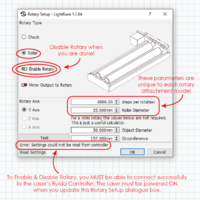
- A: This is a common problem caused by failing to disable the rotary attachment feature in Lightburn while the software still has an active connection to the powered-on laser. You likely remember from your class that the laser must be powered off any time you are connecting or disconnecting the y-axis connector with the rotary attachment. But when you turn the laser back on, it will still "think" it's in rotary mode until that feature is disabled in Lightburn while it can successfully read and send settings to the Ruida controller.